The label is applied by someone who will never see the scanner that reads it. That distance — a factory floor in Guangdong, a receiving lane in Ontario, California — is where the failure usually happens, and it is not a print setting.
Amazon's technical specification for that sticker has barely moved in a decade. The quarter-inch margin and the ban on inkjet printers both appear in a quick-reference guide whose revision date is 2016, and the live help page carries the same two rules today.
What moved in 2026 is who is allowed to skip the sticker, and who pays when it is wrong. Two dates did that, and they pull in opposite directions.
Who has to label a unit after 31 March 2026
Start here, because the answer decides whether the rest of this page applies to you at all.
| Your position | Need an FNSKU sticker? | Why |
|---|---|---|
| Brand owner, Brand Representative role in Brand Registry, product new and carrying one scannable UPC/EAN/ISBN that matches one ASIN | No | Manufacturer barcode accepted since 31 March 2026 |
| Brand owner, but the product has no manufacturer barcode (GTIN-exempt) | Yes | Nothing else for the scanner to read |
| Reseller, including an authorized reseller | Yes, even if the box has a UPC | Attribution: Amazon must know whose unit it is |
| Anyone shipping used, refurbished or bundled stock | Yes | The manufacturer-barcode route is limited to new products |
| Brand owner, product carries an expiration date | Yes | Expiration-dated stock cannot be tracked with a manufacturer barcode |
Policy source: Amazon Seller Central, Use Amazon barcodes for FBA (G200141490), checked 3 November 2026.
The asymmetry looks arbitrary until you read why, and Amazon's barcode choice and labeling FAQ↗ answers it without much warmth: brand owners hold direct responsibility for quality and buy their GTINs from GS1, so the identifier can be trusted to point at one product — the eligibility test itself sits in Use manufacturer barcodes for FBA↗. A reseller's UPC points at the same product as everyone else's, which is exactly the ambiguity the barcode is there to remove.
Expiration-dated stock is the exception that catches brand owners who read the table quickly. A manufacturer barcode cannot be used to track it, so the sticker comes back even for a Brand Representative. The date then has to sit on the outer carton as well as on every unit inside, and Amazon's expiration date rules↗ stack a shelf-life floor on top: whatever the customer needs to consume in full, plus 90 days, still remaining at check-in.
What happened to stock that was already stickerless
Units that were sitting in, or in transit to, a fulfillment center before 31 March 2026 keep selling under their original SKU. The new requirement lands on shipments created after that date. If you are a reseller converting a stickerless listing, Amazon has you create a new offer that uses Amazon barcodes; ratings and reviews follow the ASIN, so they do not reset.
The other date, which moved the opposite way
On 1 January 2026 Amazon stopped offering prep and item labeling↗ for US FBA shipments entirely, a change also written into the Selling Partner API changelog↗. That ended a service that cost $0.55 a unit for labeling alone, and it applied to inventory arriving through AWD, Amazon Global Logistics, Amazon SEND and the Supply Chain Portal as well as anything you sent direct.
Policy source: Amazon Seller Central, FBA Prep Service (G201023020), including the discontinued per-unit rate card, checked 3 November 2026.
So January removed your fallback, and March removed the sticker requirement for one class of seller. Read one without the other and you get the wrong answer for your own account.
FNSKU, UPC, ASIN: which code the scanner reads
Three identifiers get used interchangeably in conversation and are not interchangeable in a warehouse.
| Code | What it identifies | Who assigns it | Where it appears |
|---|---|---|---|
| UPC, EAN, ISBN | One product, globally | The brand, through GS1 | Printed on the retail packaging |
| ASIN | One product page on Amazon | Amazon | On the listing, never on the unit |
| FNSKU (X00...) | One offer of one product in one condition | Amazon, per seller | On a sticker you apply |
The last row is the one that decides your prep. A UPC says "this is a 500 ml bottle of shampoo." An FNSKU says "this is your 500 ml bottle of shampoo, in new condition, offered by you." Several sellers can hold the same UPC. Only one can hold a given FNSKU.
That is also what the sticker was protecting you from. When units of one ASIN from different sellers sit in the same bin, the fulfillment center ships whichever is nearest the picker, which Amazon calls commingling, and the customer can receive another seller's stock. The review still lands on the ASIN. On a stable product with one revision, nobody notices. On a product with batches, a formula change or grey-market supply, the difference is the whole complaint.
It also explains why the reseller row above has no exception in it, as Amazon's barcode FAQ↗ sets out. A reseller's units and the brand's units carry the same GTIN, so the sticker is the only thing on the box that says whose stock it is.
Choice rule: Amazon Seller Central, FBA barcode choice and labeling FAQ (GEFKUGES6NSE7CBP), checked 3 November 2026.
The FNSKU label itself: three fields and two margins
An FNSKU is Amazon's barcode for one offer of one product in one condition — not the manufacturer's UPC, and not the ASIN. It usually starts with X00.
The printed label carries three things, per Amazon's label requirements for FBA↗:
- the barcode, with the FNSKU readable underneath it
- the product name
- the item condition
The condition is translated into whatever language your Seller Central account is set to. The product name is not translated. That detail matters when a supplier in China generates labels from their own template and prints 新品 where Amazon expects New.
| Specification | Requirement |
|---|---|
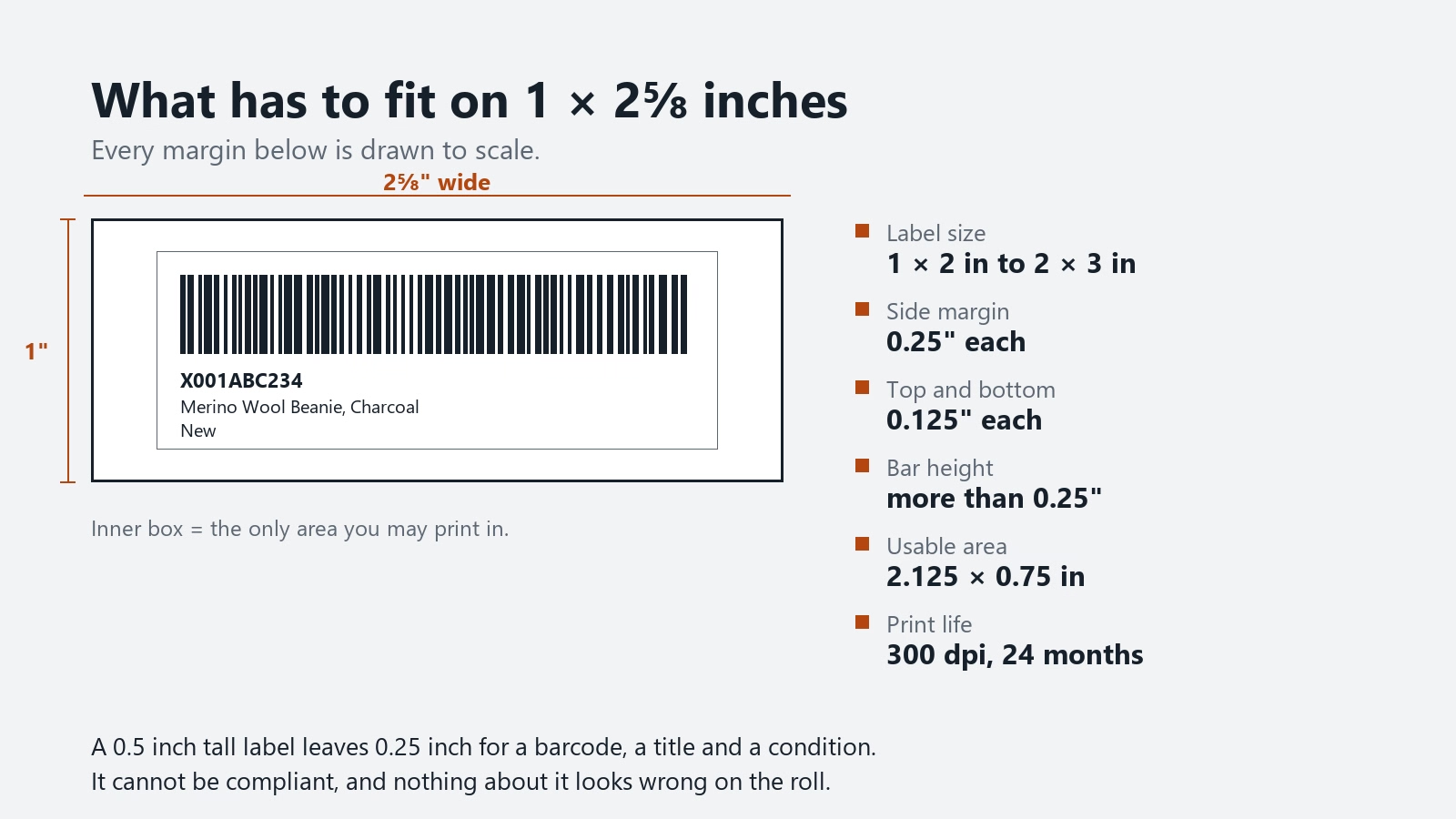
| Label size | Between 1 × 2 in and 2 × 3 in (1 × 3 and 2 × 2 both qualify) |
| Stock | White, non-reflective, removable adhesive |
| Ink | Black only |
| White space inside the label, around the barcode and text | 0.25 in left and right, 0.125 in top and bottom |
| White space from label content to the label edge | Same: 0.25 in sides, 0.125 in top and bottom |
| Distance from label edge to packaging edge | 0.25 in |
| Resolution | 300 dpi or greater |
| Legibility | Readable and scannable for 24 months |
Policy source: Amazon Seller Central, Use Amazon barcodes for FBA (G200141490), label and printer requirements, checked 3 November 2026.
The arithmetic that kills a homemade label design
Take the standard 1 × 2⅝ inch label. The 1 inch is the height, and 0.125 inch comes off the top and the bottom before anything else is printed. That leaves 0.75 inch.
Inside it you need a barcode whose bar height exceeds 0.25 inch, plus the FNSKU in text, plus the product name, plus the condition. Two lines of 6-point text take about 0.1 inch each. Add a 0.3 inch bar and you are at roughly 0.5 inch of content inside a 0.75 inch window.
It fits, with about a quarter of an inch to spare. Now try the same design on a 2 × 0.5 inch label, which is a size people order because it looks tidier on a small box. The margins eat half the height before a single bar is printed. The label is non-compliant before it leaves the printer, and nothing about it looks wrong on the roll.
Printing FNSKU labels: what Amazon specifies, and what it leaves open
Amazon wants a direct thermal or laser printer at 300 dpi or more, and it names the hardware on the other end of the process: fulfillment centers currently run Zebra GX430t printers on a direct thermal setting. Matching that resolution is the point. A 203 dpi label can look crisp to you and fall apart under a scanner built for 300.
Inkjet is out, for a reason you can see on any carton that crossed an ocean: the ink sits on the surface and moves.
Set printer scaling to None or 100% when you print the PDF. Every "fit to page" default shrinks the barcode along with the page, and the result fails without looking wrong: Amazon lists unscannable barcodes as a defect category in its own right.
What the appendix says that the help page doesn't
Amazon's packaging and shipping quick-reference guide↗ carries a barcode specification table that the live help page has no equivalent for:
| Barcode property | Value |
|---|---|
| Symbology | Code 128A |
| Bar height | Greater than 0.25 in, or 15% of barcode length |
| Narrow element | 3.33 mil at 300 dpi |
| Wide-to-narrow ratio | 3:1 |
| Quiet zone, sides | Greater than 0.25 in |
| Quiet zone, top and bottom | Greater than 0.125 in |
Specification source: Amazon, Packaging and Shipping Inventory to Amazon quick-reference guide, barcode specification appendix, checked 3 November 2026.
These numbers explain why the margin rule exists. A Code 128 symbol needs clear space on both sides or the scanner reads the quiet zone as part of the code and refuses it. If you generate labels with your own software rather than Seller Central, this table is the part you cannot guess.
Direct thermal or thermal transfer
Ribbon or no ribbon is the entire difference between the two, and it only becomes visible weeks after the label is applied.
Direct thermal paper is developed by heat, which is why it needs no ribbon. That same property keeps working after the label is applied: a container that sits on a deck through a summer crossing, or a pallet parked against a south-facing wall for six weeks, is a slow development bath. The 24-month legibility requirement is measured in a warehouse, not in transit.
If your labels are applied at the factory and the goods travel by sea, ask for thermal transfer with a wax-resin ribbon on a coated stock. It costs more per label and it does not care how hot the container gets. If your labels are applied in your own warehouse the week before the truck arrives, direct thermal is fine. Longer, cheaper routings buy you more weeks in the box, and the rate side of that trade is in the China to USA shipping cost calculator.
The sizes, and the one everybody uses
Amazon's tools support eleven sheet formats. One is US Letter: 30 labels per page at 1 × 2⅝ inch, which is the Avery 5160 die. The other ten are A4, from 21 per page at 63.5 × 38.1 mm down to 44 per page at 48.5 × 25.4 mm.
At volume the arithmetic pushes you to rolls: 2,000 units on 30-up sheets is 67 sheets, each of which has to be fed, aligned and peeled. Amazon publishes no roll specification, so a 2¼ × 1¼ inch roll or a 3 × 1 inch roll is compliant by fitting inside the 1 × 2 to 2 × 3 inch window, not because a document blesses it.
FNSKU placement: five rules and four exceptions
The scanner only cares about geometry. Amazon's placement list is short:
- the correct barcode on each item
- every other visible barcode covered
- the barcode scannable after prep materials go on
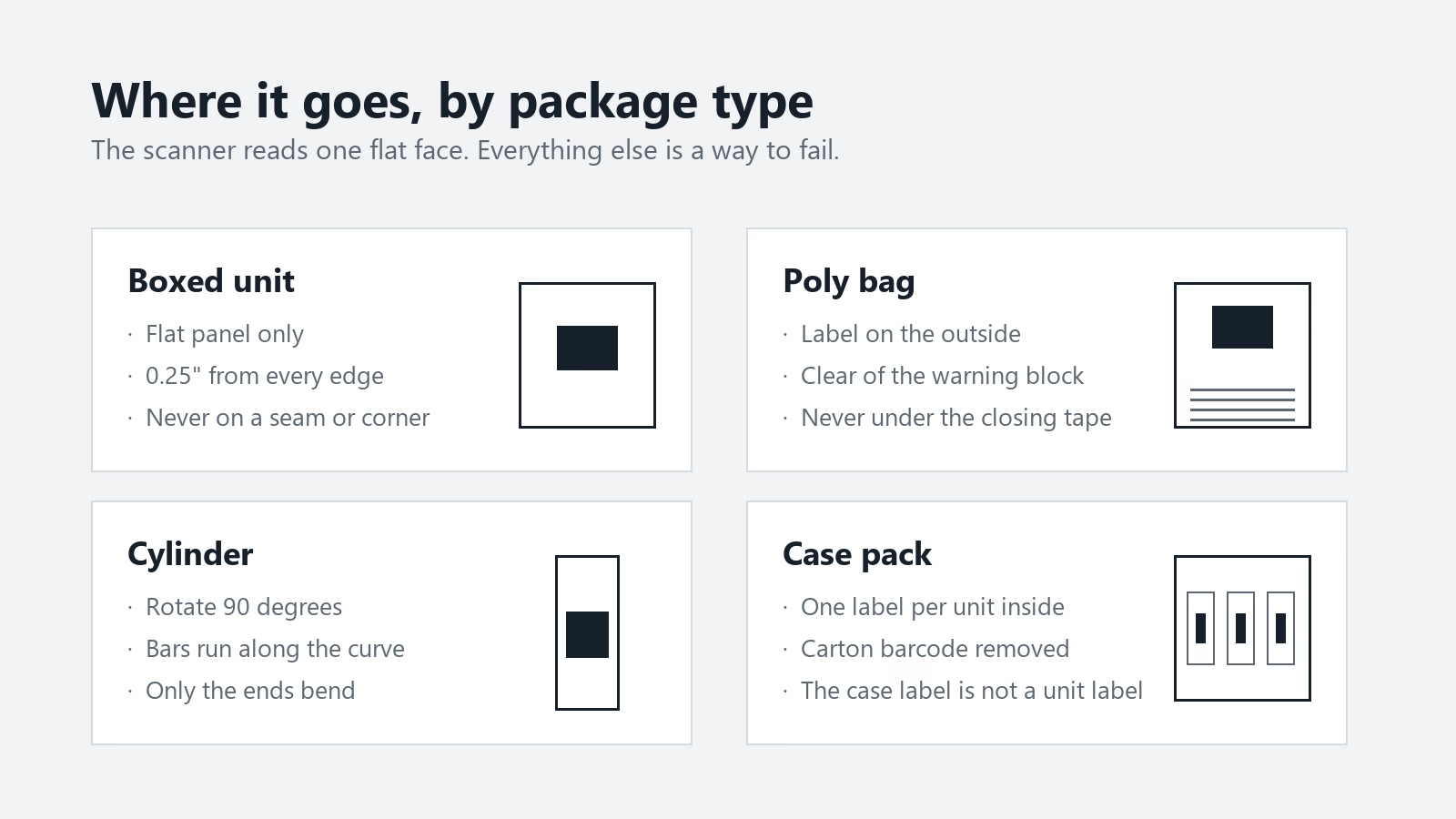
- nothing on a curve or a corner
- 0.25 inch between the label and the packaging edge
The exceptions are where published guidance gets thin, and where a well-meaning prep team creates a second defect while fixing the first.
The codes you must not cover
Three categories have to stay readable next to the FNSKU, and each one turns a routine cover-up into a second defect:
- serial number barcodes
- Transparency↗ authentication codes
- any sticker carrying warning, safety or compliance information
That last one turns the standard advice, to cover other barcodes with opaque tape or a black marker, into a hazard. On a poly bag, the same face often carries the suffocation warning. Tape over it to hide a UPC and you have manufactured a missing-warning defect. Amazon lists that as its own problem type in the inbound summary.
The workable sequence is: place the FNSKU so it covers only the manufacturer barcode, and never place it over a warning block. If the two collide on a small face, move the FNSKU to another panel rather than shrink it.
Bottles and tubes
On a cylindrical unit, place the label vertically. Wrapped the long way around a bottle, it bends through the scan line at both ends; rotated, only the top and bottom edges curve and the middle stays flat enough to read.
This rule appears in Amazon's inbound problem summary↗, not on the labeling page, which is why it does not appear on the page that most labeling guides are built from.
The case pack
Two arrangements get called a case pack, and the label count differs.
If the case is the sellable unit, meaning a 24-pack sold as one ASIN, the case carries one barcode and the units inside carry none of their own, because nobody scans them one at a time. Amazon's ceiling is 150 units per case, all the same SKU and condition, packed by the manufacturer.
If the units are sold individually and merely arrive in the factory's case, every unit needs its own Amazon barcode and the case is a shipping box, so its old barcode comes off or gets covered. Receiving scans one unit from a case-packed box and books the whole box off that scan, which means one wrong unit inside is enough to mislabel the case. Factories that print their own carton code for their own warehouse are the usual source of that one.
A set sold as one unit
A set of six that sells as one item needs a sticker that says so. Amazon's packaging requirements↗ list three acceptable phrasings: "Sold as set", "Ready to ship", or "This is a set. Do not separate". Without one, an associate can split the set during receiving and the components become unsellable inventory.
Two rules stack here. Every barcode on the components has to be covered or made unscannable, and the set takes one FNSKU on the outside of the bag. The set sticker is a second label, not a substitute for the barcode. The two carry different information and Amazon looks for both.
Packaging rule: Amazon Seller Central, product packaging requirements (G200141500), sold-as-set and poly-bagged units, checked 3 November 2026.
The carton label is not the unit label
The expensive factory mistake is rarely the wrong barcode. It is the right barcode on the wrong surface.
| Label | Identifies | Printed from | Goes on |
|---|---|---|---|
| FNSKU | One sellable unit | The listing | Every unit |
| FBA Box ID | One carton within one shipment | The Shipping Queue | One per carton, outside |
| FBA Pallet ID | One pallet | The Shipping Queue | Four per pallet, top centre of each side |
An FNSKU on the outside of a carton does nothing for that carton. A Box ID on a unit stops the unit from being received at all.
Amazon's shipping and routing requirements↗ ask for a unique Box ID label on every box in a shipment, generated from the Shipping Queue rather than by the supplier, and each box may only hold inventory from one Shipment ID. Consolidating two shipments into one carton to save packaging is a defect no matter how clean the labels are. Reused cartons are the quiet version of the same failure: an old Box ID or a carrier label left under the new one gets scanned first, and the carton routes to a shipment that closed weeks ago.
Carton rule: Amazon Seller Central, Shipping and routing requirements (200141510), checked 3 November 2026.
The poly bag problem
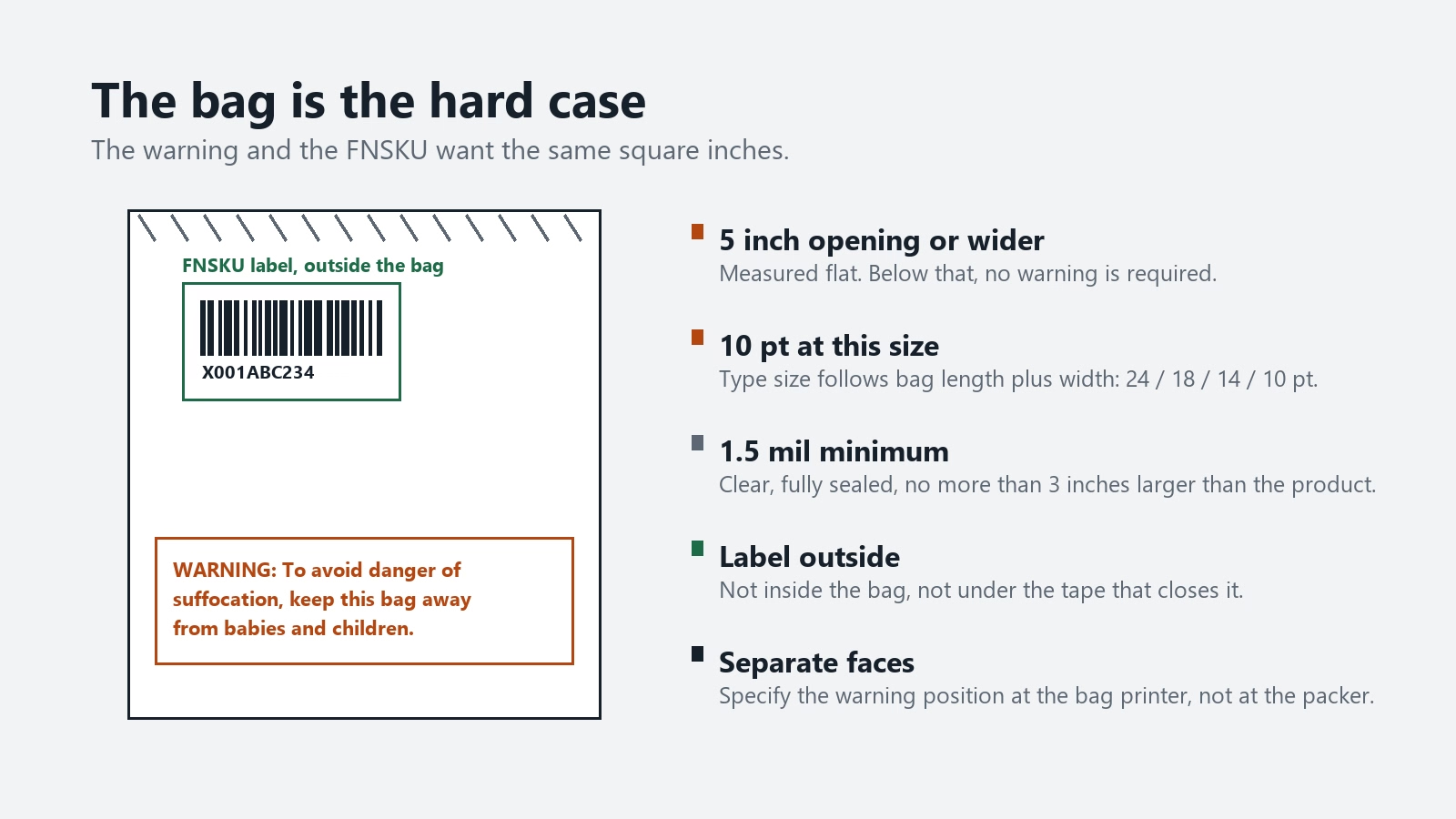
A bag with an opening of 5 inches or more, measured flat, needs a suffocation warning under Amazon's poly-bag packaging rules↗. The warning can be printed on the bag or applied as a label, and its type size is set by the bag's dimensions:
| Total length plus width of bag | Minimum print size |
|---|---|
| 60 inches or more | 24 point |
| 40 to 59 inches | 18 point |
| 30 to 39 inches | 14 point |
| Under 29 inches | 10 point |
Policy source: Amazon Seller Central, product packaging requirements (G200141500), poly-bagged units, checked 3 November 2026.
Now add the other rules. The bag has to be at least 1.5 mil, clear, fully sealed, and no more than 3 inches larger than the product. The barcode must be scannable through the bag, or an X00 or ASIN label has to sit on the outside of it. And the FNSKU must not cover the warning.
On a 12 × 16 inch bag, the warning runs to 28 inches of length plus width, so it prints at 10 point — small, but a solid block of four or five lines. Put the FNSKU on the same face and something has to give.
The fix costs nothing if you plan it at the bag supplier: have the warning printed in a fixed position on the lower third, and specify the FNSKU panel as the upper face, clear of the seal. Label on the outside of the bag, never inside it, and never under the tape closing the bag.
What to send the factory
Most labeling failures are decided in a purchase order, months before anyone prints anything. Copy this into the PO as a separate instruction block, in English, and ask for a photo before the carton is sealed:
Amazon FNSKU labeling — applies to every unit in this order
- One FNSKU label per sellable unit. Units sold individually get one each, even inside a factory case; a 24-pack sold as one item gets one label on the case.
- Label size between 1 × 2 in and 2 × 3 in. Do not cut down to fit a small box.
- 300 dpi minimum, thermal transfer with ribbon, black on white non-reflective stock with removable adhesive.
- Print at 100% scale. Do not use fit-to-page.
- Cover the manufacturer UPC, EAN or ISBN completely. Do not cover serial number barcodes, Transparency codes, or any warning, safety or compliance label.
- Place on a flat panel, at least 0.25 in from every packaging edge, never on a curve, corner or seam.
- On cylindrical units, apply the label vertically.
- On poly bags, apply the label to the outside, on the face that does not carry the suffocation warning.
- Remove any barcode printed on the outer carton.
- Use the label file generated from the current listing. Do not reuse last shipment's PDF.
Line 10 is the one that gets skipped. The FNSKU encodes the offer, so it survives a title edit, but Amazon's own inbound guidance measures a correct label against three things: FNSKU, title and condition. A label printed from a file saved before a listing title changed is a mismatch waiting for a receiving associate to notice.
Ask for two things back, and ask for them in writing: a photograph of one labeled unit and one labeled carton, and a scan test with a handheld scanner. A phone camera will not tell you whether a barcode reads. A cheap handheld scanner will.
This is also the point where the shipping decision and the labeling decision meet. If the unit is bagged, bundled or sold as a set, the prep changes the label placement, and the prep requirements for the whole load are covered in the China to FBA shipping walkthrough.
Before the container is sealed: three checks
Everything above is a specification. These three decide whether the specification survived the factory.
A scan audit on a sample
Scan finished cartons on the floor with a handheld 1D scanner, not the label PDF on a laptop. The rate is your call; 10% is a common starting point, but the sample has to include every variant in the shipment, not the first carton off the line. What you are testing is that each label returns the FNSKU the packing list expects, which is the only way to catch a crossed variant. A phone camera will not do this: it reads a barcode in good light at close range and tells you nothing about a 300 dpi scanner.
A first-carton check on arrival
Scan the first cartons off the pallet at the destination warehouse, before the load leaves for the fulfillment center. Whatever the container did to the labels has already happened by then, and a carton that fails here can be relabeled at a 3PL for cents instead of being refused at the dock and trucked back. Peel a corner of one label while you are there. Stock that lifts its own print has failed the 24-month legibility requirement on day 40.
Documents that match the boxes
Three documents have to agree before the container closes: the packing list, the FBA Box ID labels, and the shipment in Seller Central. Check SKU, FNSKU, condition and quantity per box, not just the shipment total. A total that matches while one carton holds 20 units instead of 24 is still a receiving defect, because the box is what gets scanned.
What a failed label actually costs
A unit that arrives without a valid Amazon barcode is not quietly set aside. Amazon marks it defective, applies a barcode sticker itself, and records the defect on your Inbound Performance Dashboard↗, with guidance attached. The unit usually still gets sold. It just gets sold after someone else fixes it, and the fix is on your record.
Two consequences follow from that record. Units that were not labeled to Amazon's requirements are not eligible for reimbursement if they are later lost or damaged in the network, which is a quiet loss that shows up months later as inventory that cannot be found and cannot be claimed. And repeated inbound problems can suspend shipment creation privileges until the issue is resolved.
Policy source: Amazon Seller Central, FBA barcode choice and labeling FAQ (GEFKUGES6NSE7CBP) and Use Amazon barcodes for FBA (G200141490), checked 3 November 2026.
The $0.55 per-unit labeling fee that used to absorb all of this ended on 1 January 2026. There is no longer a price at which Amazon fixes a bad label for you; the only price is the defect.
Removed and returned stock goes through the same test in reverse. Units coming back from a removal order arrive with labels that are often damaged, and they cannot re-enter without a fresh compliant label — the arithmetic for that round trip sits in what an FBA removal really costs.
When printing in-house is the wrong choice
The default advice is to buy a thermal printer and do it yourself. Four situations where that costs more than it saves:
You have more than a handful of variants
Ten colours, one product, one label file per FNSKU. Hand-application at that point produces crossed labels, and a crossed label is worse than a missing one because it scans and credits the wrong SKU.
The product carries a date
Expiration-dated stock needs the date on the unit and on the carton, and it has to survive to check-in. A label applied in a factory in March is a date claim you cannot verify in June.
The listing is not final
Title and condition are printed on the label and are part of what Amazon matches against. If the listing is still moving, wait.
Your volume is under a few hundred units a quarter
A thermal printer, stock and ribbon for 200 labels a year is a hobby. The label stock alone will expire before you finish the roll.
Five mistakes that cost the most
Covering the suffocation warning
- Symptom: the FNSKU sits squarely over the warning block on a poly bag, because that is where the manufacturer's UPC was.
- Cost: a missing-warning defect on the whole shipment, plus a relabel at your expense, plus the delay at check-in.
- Fix: specify the warning position at the bag printer, and give the FNSKU a face of its own.
Printing from last shipment's file
- Symptom: labels are crisp and scan fine, but the title on them is the old title, or two variants share a code because the file was built before the second colour existed.
- Cost: mislabeled units, which is a defect category of its own, and inventory credited to the wrong SKU.
- Fix: regenerate the label file from the current listing for every purchase order, and never let the factory keep a copy.
One label on the case
- Symptom: a 24-count case arrives with a single FNSKU on the outside and nothing on the units.
- Cost: 24 units marked defective, 24 stickers applied by someone else, one dashboard entry that counts against the next shipment.
- Fix: write "every unit inside the case pack" into the PO, and check the photo before the carton is sealed.
Label on a glossy surface
- Symptom: the FNSKU sits on shrink film or a laminated panel with a mirror finish. It looks perfect and reads as nothing.
- Cost: the batch arrives unscannable, Amazon relabels it, and the defect is on your record.
- Fix: the stock has to be white and non-reflective, and so does the surface under it. Matte thermal stock on the matte outer film, not gloss on gloss.
Label crushed by strapping
- Symptom: unit labels applied before the pallet is built, then banded and wrapped with the strap running straight across the labelled face. By the time it lands, the paper is cut through.
- Cost: a damaged barcode is the same defect as a missing one, and it usually hits the pallets at the bottom of the load.
- Fix: corner boards on all four vertical edges, wrapping before banding, and strapping routed clear of any labelled face.
FAQ
Do I still need FNSKU labels if I am brand registered?
Only if your product has no manufacturer barcode. A brand owner with the Brand Representative role, shipping a new product that carries one scannable UPC, EAN or ISBN matching a single ASIN, can use that barcode instead. GTIN-exempt products still need the sticker.
Can I print FNSKU labels on an inkjet printer?
No. Amazon requires a direct thermal or laser printer at 300 dpi or more, and states that inkjet output smears and blurs. The failure is not cosmetic: a smeared barcode is logged as unscannable.
What size should an FNSKU label be?
Anywhere between 1 × 2 inch and 2 × 3 inch. The 1 × 2⅝ inch, 30-per-sheet US Letter format is the most common because it is the default in Seller Central.
Does the FNSKU go over the UPC?
Yes, and it has to cover it completely, so only one barcode is scannable. The exceptions are serial number barcodes, Transparency codes, and warning or safety labels, which must stay visible.
What happens if a unit arrives without a label?
Amazon marks it defective, applies a barcode itself, and records the defect on your Inbound Performance Dashboard. That batch loses eligibility for reimbursement if it is later lost or damaged.
Can the label go inside the poly bag?
No. It has to be on the outside of the prep material, or scannable through a clear bag that meets the thickness and sealing requirements.
What happens if the label is unscannable at the fulfillment center?
Same as a missing label. The unit is marked defective, Amazon applies a barcode itself, and the defect lands on your Inbound Performance Dashboard. The unit still sells. The record is yours, and unlabelled stock loses reimbursement eligibility if it is later lost or damaged in the network.
Can I print on plain paper and tape it on?
No. The stock has to be white, non-reflective and removable, printed by a direct thermal or laser printer at 300 dpi or better. Tape puts a reflective layer over the symbol and a second surface between the print and the scanner, and inkjet output has already failed on resolution before the tape matters.
Does Amazon still prep and label units in 2026?
No. The US prep and item labeling service ended on 1 January 2026, at $0.55 a unit for labelling alone. Everything arriving now has to be prepped and labelled before it reaches the dock, including inventory routed through AWD, Amazon Global Logistics, Amazon SEND and the Supply Chain Portal.
What is the maximum box size and weight?
36 × 25 × 25 inches and 50 lb, per Amazon's routing requirements↗: length up to 36 inches, width and height no more than 25 each. A single oversize item can push a box past those numbers, and a box over 50 lb needs Team Lift labels on the top and sides, with 65 lb as the ceiling. Jewellery and watches stop at 40 lb.
Note that Amazon's own pages disagree with each other on the length. The routing requirements page allows 36 inches, while the quick-reference guide and the Send to Amazon FAQ still say no side over 25. Build to 25 if you would rather not argue with a receiving associate.
Sources
| Document | Issued by | Reference |
|---|---|---|
| Use Amazon barcodes for FBA↗ | Amazon Seller Central | G200141490 |
| FBA barcode choice and labeling FAQ↗ | Amazon Seller Central | GEFKUGES6NSE7CBP |
| FBA Prep Service↗ | Amazon Seller Central | G201023020 |
| Packaging rules for poly-bagged units↗ | Amazon Seller Central | G200141500 |
| Inbound problem summary↗ | Amazon Seller Central | G200893760 |
| Use manufacturer barcodes for FBA↗ | Amazon Seller Central | G200141480 |
| Packaging and Shipping Inventory to Amazon↗ | Amazon Services | Quick-reference guide |
| US FBA prep and labeling services to end 1 January 2026↗ | Amazon Selling Partner API | Changelog |
All sources checked 3 November 2026. Rates, dates and page numbers change; the checked date is part of the citation, not decoration.